
Features
Everything your business needs for its people.
Rota, time tracking, leave, qualifications and an app for everyone – one system, the same data, nothing maintained twice. Here is every feature in detail.
Rota & planner
The week in minutes instead of hours.
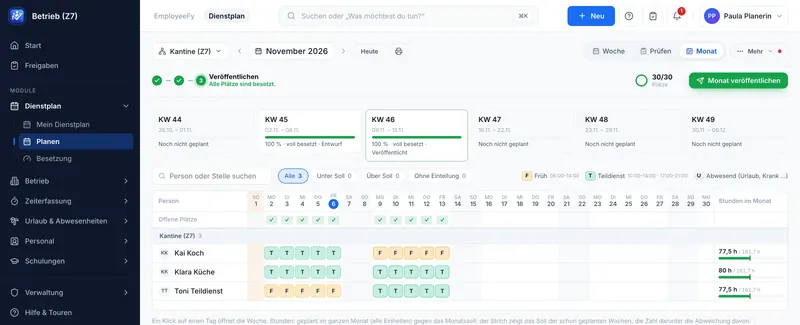
Shifts, people, target hours, required roles and on-call duty in one view. “Fill automatically” only assigns people who fit without breaking a rule – ranked by shift rotation, open hours, qualification, wishes and fairness.
- Choose the focus: balanced, target hours, wishes, fair nights, days off in a row
- Shifts past midnight, split shifts, partial shifts, help from neighbouring units
- Wish days off with a quota, open shifts, swaps and take-overs with or without approval
- Month view, print-outs for people without a phone, suggestions learned from your own manual changes
Labour law built in
Check before the week goes out.
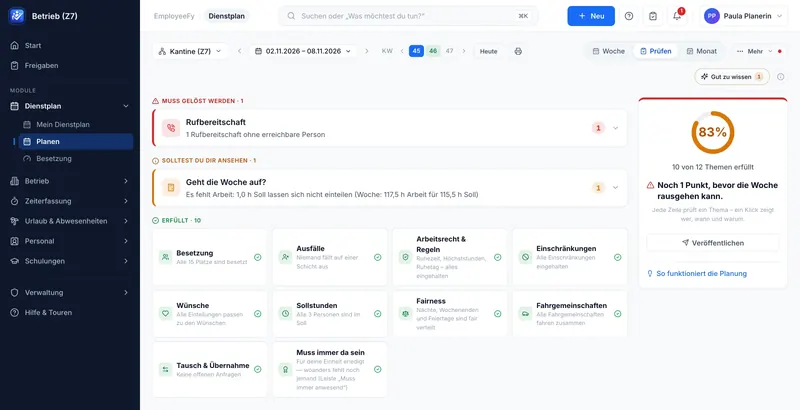
Rest periods, maximum hours, reference periods, weekly rest, Sundays and public holidays, night work and youth protection are checked with every assignment – swaps and take-overs included. Per rule you decide: off, warning or block.
- Country presets for Austria, Germany and Switzerland – adjustable to your contract and collective agreement
- A value of its own per company, site or unit – only where it really differs
- “Must be solved” and “worth a look” clearly apart
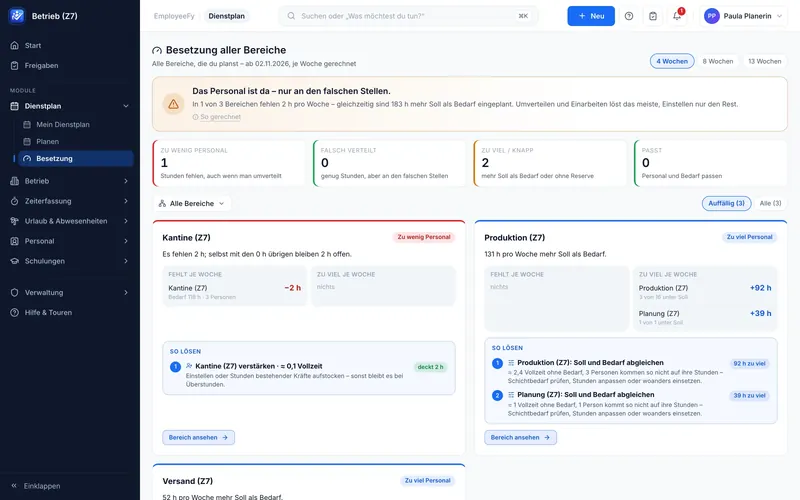
- Staffing across all units: too few, badly distributed or too many – with a suggested fix
On-call duty & required roles
Who is responsible today? The answer is already there.
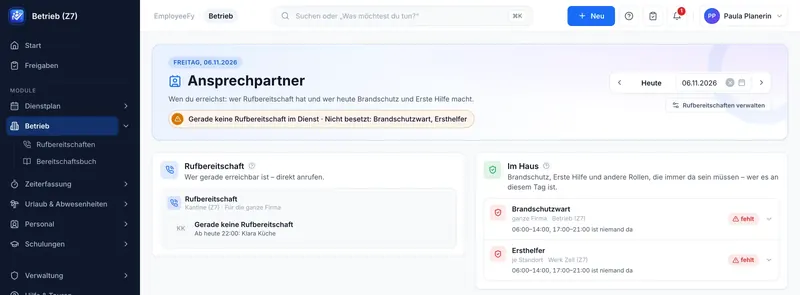
On-call duty per team as a rotation: plans weeks ahead and skips people who are sick or on leave. Plus required roles like first aiders and fire wardens – Employeefy shows when someone is missing and who could step in.
- On-call rotation with templates and swaps – a day or a whole turn
- On-call log for call-outs, evaluation per person
- Required roles fixed (“always 1”) or growing with the number of people present
- Gaps with the exact time and a suitable replacement
Time tracking
One button to clock in. Every minute on the right account.
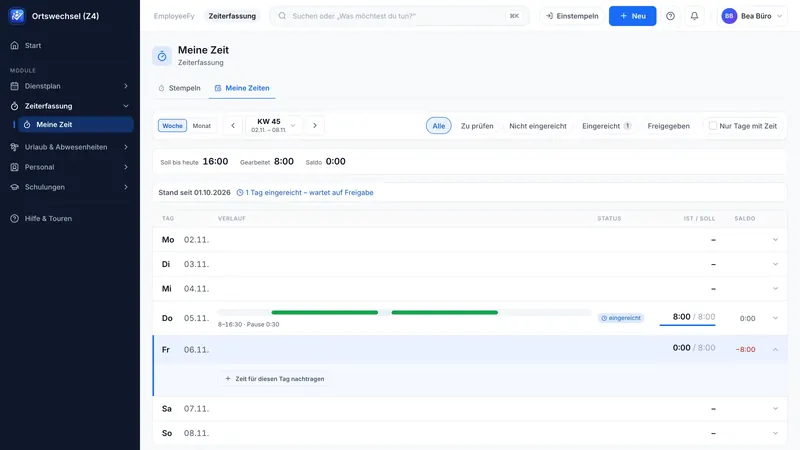
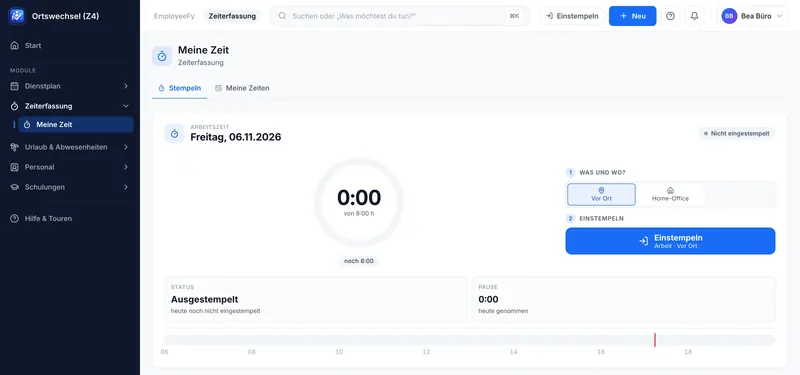
Clock in from the browser, the app or the kiosk tablet at the entrance – with staff number and PIN or a card, offline too. The week shows each day as a timeline with breaks, status and balance.
- On site, home office or on the road – allowed per unit
- A forgotten clock-out is detected and can be corrected with approval
- Time accounts, balances and premiums for nights, Sundays and holidays
- Location only at the moment of clocking in, if you want it – never a movement profile
Approvals & payroll export
From clocking in to payroll – without retyping.
Leave, swaps, proofs and working time land in one list. Working time is approved in two steps – team lead first, then HR – and the closed month goes to your payroll software as a file.
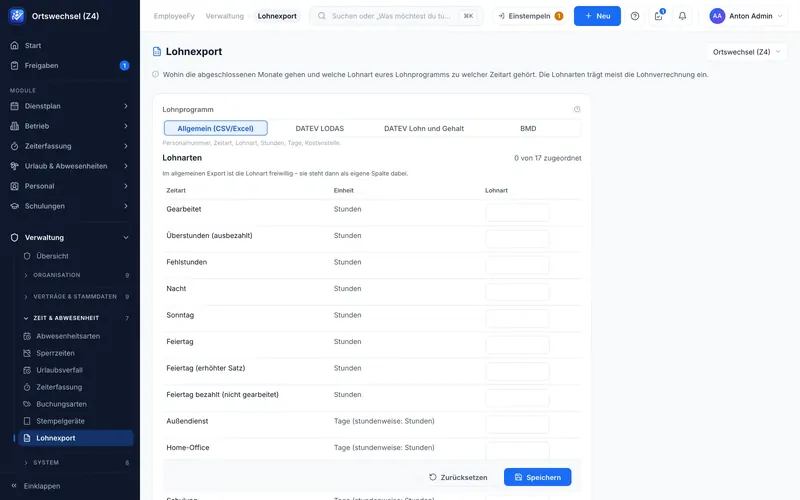
- Export formats DATEV LODAS, DATEV Lohn und Gehalt, BMD and CSV/Excel
- Map once which wage type belongs to which time type
- Month-end closing with a lock – nobody changes anything quietly afterwards
- Timesheet as a PDF for signing
Employeefy delivers the data for payroll – the payroll itself stays with your payroll software.
Leave & absence
Who is away, who is back – and does it still work?
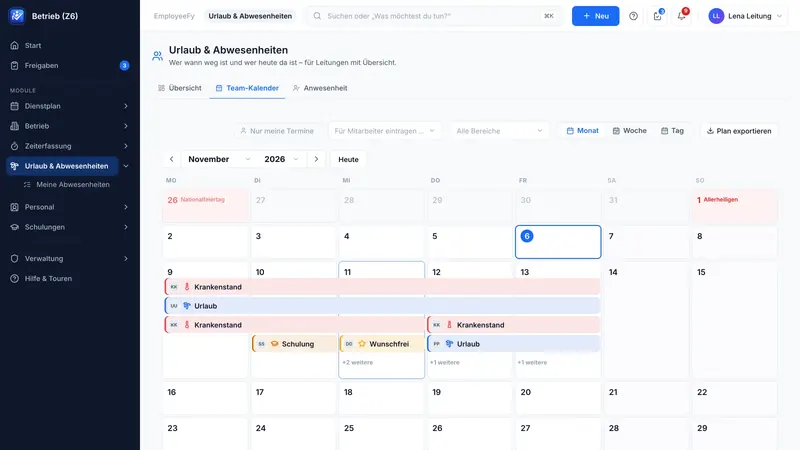
Holiday, sick leave, time off in lieu, wish days off, training and home office in one team calendar. Employeefy checks staffing as soon as a request comes in – the team lead decides with all the facts.
- Approval goes to the right team lead – with deputies and escalation
- Leave account with carry-over, expiry, pro-rata entitlement, in days or hours
- Sick notes with proof uploaded as a photo or PDF from the app
- Blocked periods and company closures for company, site or unit
Setup assistant & quick start
Guided, not complicated.
The assistant asks about your business in 15 steps – each with a suggestion for your country and industry. Nothing is created until you confirm. Existing lists are simply uploaded.
- Quick start from a file: exports from any software, Excel or CSV – several at once
- People are merged, spellings unified, errors shown per row
- Draw your structure like on paper, with the org chart beside it
- An import can be undone cleanly
The steps of the assistant
- Countries & languages
- Company & structure
- Contracts & working time
- Opening hours
- Qualifications
- Providers
- Training
- Jobs
- Shifts & demand
- 10Leave & absence
- 11Roles
- 12Employees
- 13Responsibilities
- 14Operating rules
- 15Time tracking
App for employees
Everything important in your pocket.
One app for all employees, for iOS and Android, on phone and tablet. It connects to your own Employeefy installation – administration stays in the browser.
- Clock in (offline too), own times and balance
- Own rota, “When can I?”, on-call duty and swaps
- Request leave, upload a sick note with proof
- Approvals for team leads, device lock, screen protection and two-factor sign-in
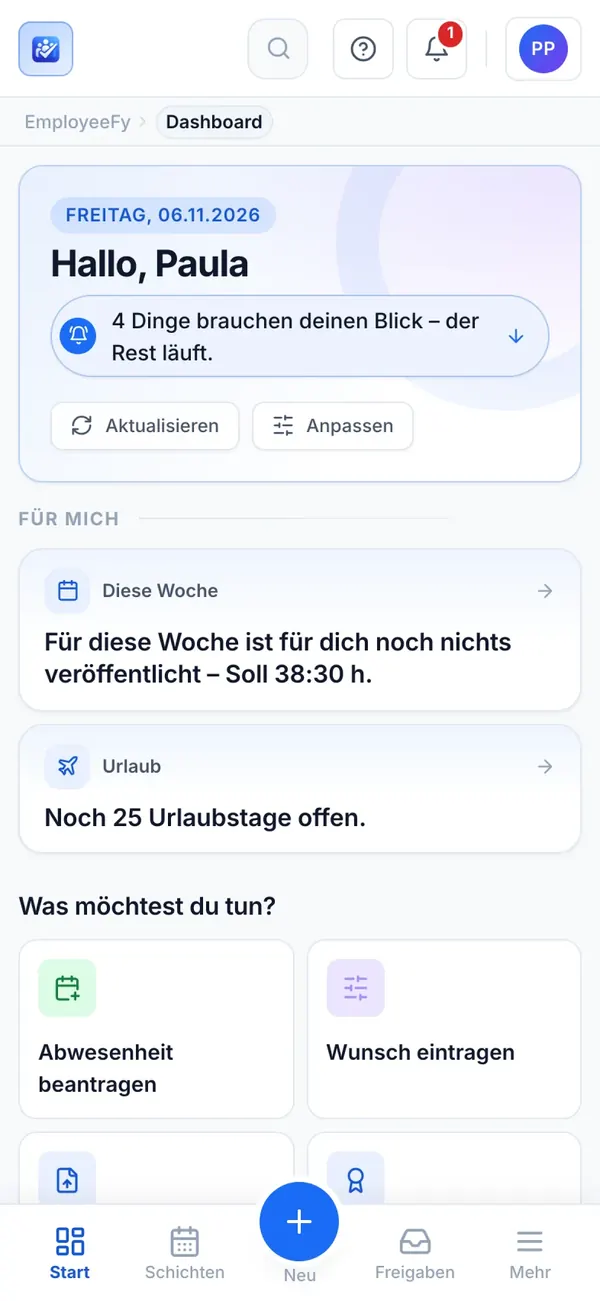
The app is finished and is being prepared for the App Store and Google Play.
Calendar subscription
The rota in your own calendar.
Subscribe once – shifts, on-call duty, absences, training and public holidays appear in Outlook, Google or Apple Calendar and stay up to date.
- One subscription for everything, set up in your own profile
- How much an entry reveals is adjustable
- Reasons for sickness never appear in the calendar
Qualifications & training
Who has what – and until when?
Qualifications with levels and certificates with expiry dates. The rota knows who is needed for a shift and warns before a certificate expires.
- Requirements per job, shift or unit
- Early warning before expiry, a hint right in planning
- Training on site, online or as proof only – with cost approval
Employees, org chart & documents
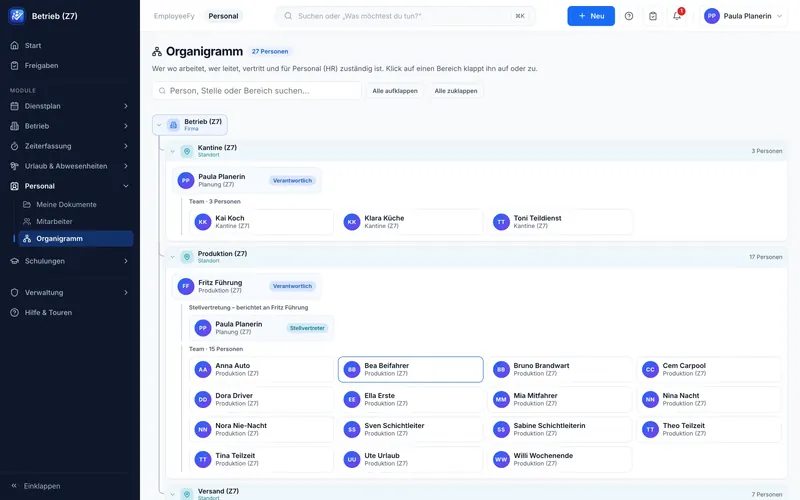
Who works where, who leads, who deputises?
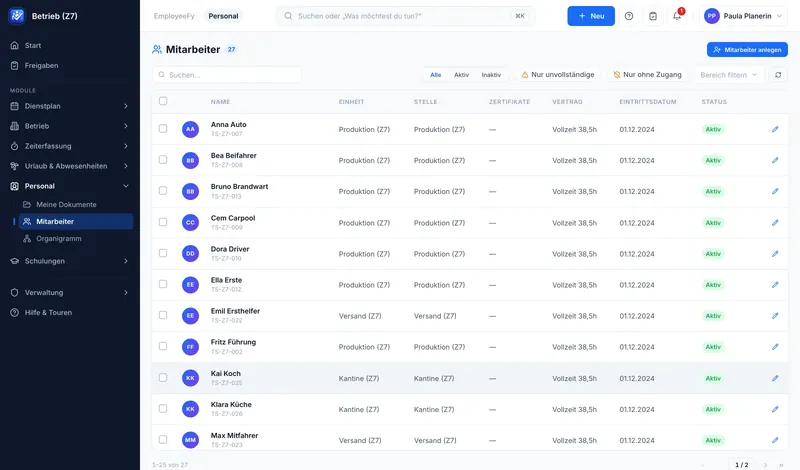
People management knows each person’s unit, job, contract and start date. The org chart follows by itself – with leads, deputies and teams.
- Contracts and working-time models on the person, changes during the year included
- Documents in folders, encrypted, separated by permission, scanned for viruses
- Document requests: missing proofs are collected
Dashboard
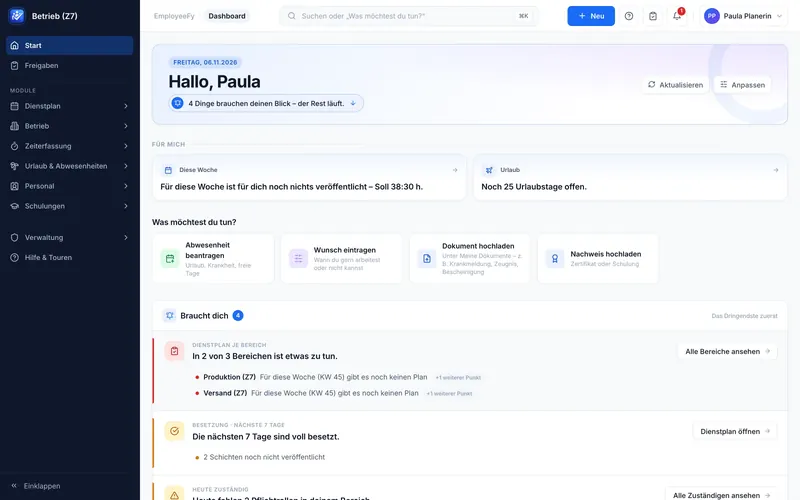
The start of the day – in whole sentences.
Everyone sees what concerns them when they sign in: who is here today? What is waiting for me? Where is someone missing? The most urgent first, details on click.
- “For me” and “needs you” apart
- Quick actions: absence, wish, document, proof
- Updated live, adjustable per role
Structure & permissions
From the family business to the group.
Several companies, sites, units and departments – settings are inherited downwards. A unit only sets its own value where it really differs.
- Groups with subsidiaries: catalogues like qualifications and jobs are shared
- Roles define what someone may do – responsibilities define where
- Team leads only see and plan their own people
- Time zone per site
Data protection
GDPR not as an add-on, but built in.
Access reports, export and anonymisation at the push of a button, retention periods, a list of who may see what, and a log of every approval. By default no location tracking and no performance rating from clocking times.
- Encrypted fields and files
- Its own installation per customer
- No tracking in the app
- Interface, e-mails and app in German and English
It is best seen live.
We show you Employeefy with a set-up that fits your business – personally, in 30 minutes.